
On This Day App
The On This Day app displays notable historical events that happened on the current date, using content from Wikipedia.
When you add and setup an app to a playlist, it appears as a scene.
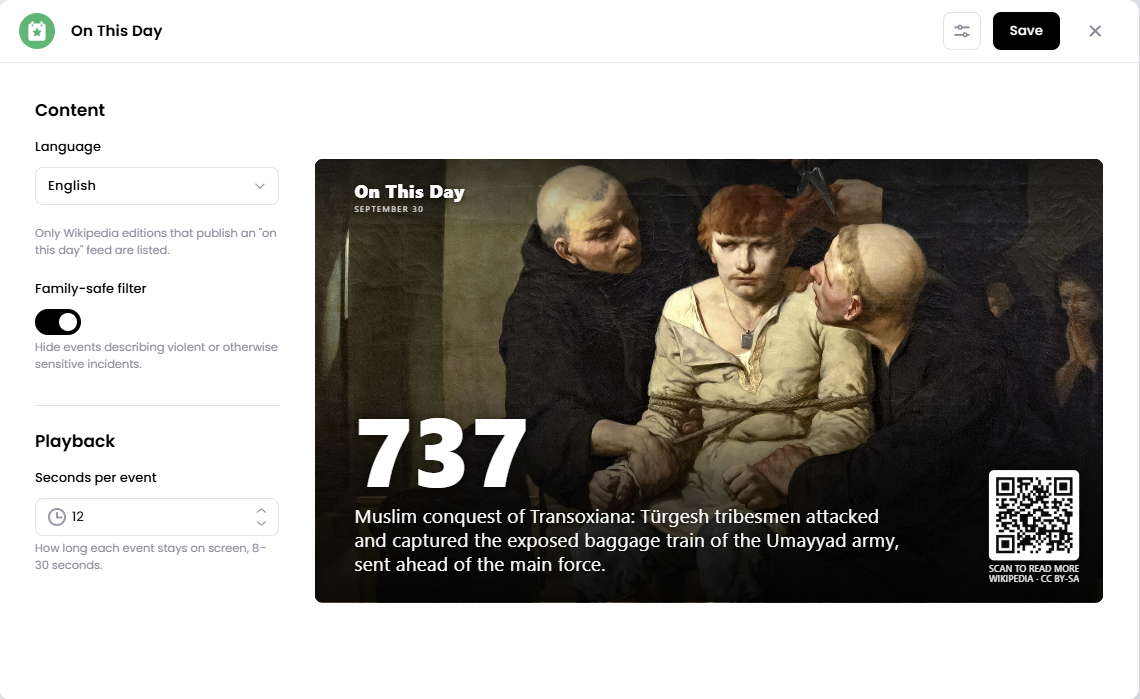
Each event includes the year, a short description, and a QR code viewers can scan to read more about the event on Wikipedia.
Add the On This Day App
Open the Playlist where you want to add the app.
In the right panel, drag On This Day into the playlist.
Open the scene to configure it.
Select your preferred Language, adjust the Family-safe filter, and choose how long each event should stay on screen.
Click Save.
Configuration Options
Language - Choose the language used for the historical events displayed on screen.
Only Wikipedia language editions that publish an "On this day" feed are available to select.
Family-safe filter - Turn this on to hide events that describe violent or otherwise sensitive incidents.
Seconds per event - Choose how long each historical event remains on screen before moving to the next one. You can set each event to display for 8–30 seconds.
Set the Scene Duration
After saving the app, you can adjust how long the On This Day scene stays in the playlist.
In the Playlist, find the On This Day scene.
Click the duration value (for example,
00:30) to set how long the scene plays.00:30means the scene will play for 30 seconds.
The scene duration controls how long the On This Day app remains active in your playlist, while Seconds per event controls how long each individual historical event is shown.
Notes
The date is automatically based on the current day, so you don't need to manually select a date.
Historical events are sourced from Wikipedia.
Available languages depend on which Wikipedia editions provide an "On this day" feed.
Enable the Family-safe filter if you want to exclude events containing violent or sensitive subject matter.
Each event includes a QR code that viewers can scan to read more about it on Wikipedia.
Use Seconds per event to control how quickly the app cycles through historical events.