Walk into a busy coffee shop and you’ll see the same thing. Customers hesitate at the menu, ask questions, and slow the line down. In a high-volume environment, that friction costs you time and sales.
That is why more cafés are switching to a coffee shop digital menu.
A coffee shop digital menu uses screens like TVs or tablets to display your drinks, food, prices, and promotions. It replaces static boards with something flexible and easy to update. You can highlight bestsellers, promote seasonal drinks, and adjust your menu throughout the day without reprinting anything.
The impact is immediate. Orders move faster. Customers make decisions quicker. Your space feels more modern and easier to navigate.
In this guide, we will show you how coffee shop digital menus work, what makes them effective, and how to set one up properly in a real café.
What is a coffee shop digital menu?
A coffee shop digital menu is a modern way to display your menu using screens instead of printed boards. It shows your drinks, food, prices, and promotions on TVs, tablets, or other digital displays. The goal is simple. Make your menu easier to read, easier to update, and more engaging for customers.
A digital menu board is a modern tool for restaurants, coffee shops, and other food businesses. It uses digital screens to present menu items along with extras like promotions or new products. Unlike printed menus, it does not stay fixed in place or become outdated.
Digital menu boards can be easily updated using a content management system. You can change prices, swap items, or highlight new offers in minutes. This flexibility is one of the main reasons cafés are moving away from traditional menus.
Most coffee shop digital menus appear as TV menu boards above the counter. Some cafés also use tablet menus or QR code menus for table service. Each format serves the same purpose, which is to make ordering faster and more intuitive.
Why every coffee shop needs a digital menu today
Coffee shops are regular stops for many people, which means competition is high and only getting higher. Customers have more choice than ever, and they expect a fast, smooth experience every time they walk in. If your menu slows them down or creates confusion, they will notice.
Customer expectations have changed. People want to scan a menu quickly, understand their options, and order without hesitation. A static board often works against that and limits how clearly you can present your offer.
At the same time, more cafés are adopting digital menus, which raises the standard across the industry. When customers walk into a space with clear, dynamic screens, it feels easier and more modern.
Here are the main reasons coffee shops are making the switch:
Faster ordering and shorter queues
Clearer menus that reduce customer hesitation
Ability to highlight high-margin or popular items
Easy updates without reprinting menus
More modern and premium in-store experience
That is why a digital menu board is an upgrade every coffee shop should consider. It creates a more welcoming environment, helps customers make decisions faster, and gives you more control over how your menu is presented.
5 key benefits of a coffee shop digital menu
A coffee shop digital menu is not just a visual upgrade. It improves how your café runs day to day and how customers interact with your menu. Here are the key benefits.
1. Quick updates
You can change your menu in minutes. Update prices, add new items, or remove sold-out products without reprinting anything. This keeps your menu accurate and saves time.
2. Stronger visual appeal
Digital menus let you use high-quality images and clean layouts. Drinks look more appealing, and your menu feels easier to read. A well-designed screen draws attention and sets the tone for your space.
3. Increased sales
You can highlight high-margin items and promotions in a way that stands out. Customers are more likely to notice featured drinks or add-ons. In fact, digital signage has been shown to increase sales by up to 33% in some cases .
4. Better customer experience
A clear, well-structured menu helps customers decide faster. This reduces hesitation at the counter and keeps lines moving. It also makes your café feel more modern and easier to navigate.
5. Cost savings over time
You avoid the ongoing cost of printing and replacing menus. While there is an upfront investment, digital menus reduce long-term expenses and give you more flexibility.
Together, these benefits make a strong case. A digital menu is not just about looking modern. It helps you run a smoother, more efficient coffee shop.
Who benefits most from a coffee shop digital menu
Not every coffee shop uses a digital menu in the same way. Some benefit more than others, depending on how they operate.
High footfall cafés - Busy locations see the biggest impact. A clear digital menu helps customers decide faster and keeps queues moving during peak hours.
Takeaway-focused shops - Speed matters most here. Customers want to order quickly and leave. A digital menu reduces hesitation and makes the process more efficient.
Multi-location cafés - Consistency becomes easier. You can manage menus across all locations from one place and update everything at once. This keeps branding and pricing aligned.
Small cafés - Even smaller shops benefit. A digital menu adds a more premium feel and gives you flexibility to update items without extra cost. It also helps you compete with larger chains without needing a full redesign.
In practice, most coffee shops will see value in some way. The key is how you use the menu to match your workflow and customer flow.
What makes a coffee shop digital menu effective
A coffee shop digital menu only works if it helps customers decide quickly. The best menus are clear, focused, and designed for how people actually order in a busy environment.
What works
Highlight your high-margin and popular items where customers will see them first. Most people do not read the full menu, so placement matters. Strong visuals also help, especially for iced drinks, seasonal items, and anything new.
Keep promotions focused. One or two offers per screen is enough. Too many options compete for attention and reduce impact.
If you want to go deeper, these principles align closely with how you can improve customer engagement with digital signage in any retail environment.
Design best practices
Your menu design should match your brand and feel consistent with your space. Clarity matters more than creativity, especially in a fast-moving environment.
Focus on these core principles:
Use fonts that are easy to read from a distance
Limit the number of items on each screen
Place key items at the top or center
Keep layouts simple and uncluttered
Use spacing to separate sections clearly
Rotate content instead of overcrowding one screen
Common mistakes to avoid
Clutter is the most common issue. Too many items, too much text, or too many visuals can slow customers down.
Poor placement is another problem. Screens that are too high, too low, or hard to see reduce effectiveness.
Many cafés also treat digital menus like static boards. If you are not updating content regularly, you miss one of the biggest advantages.
What to include in a coffee shop digital menu
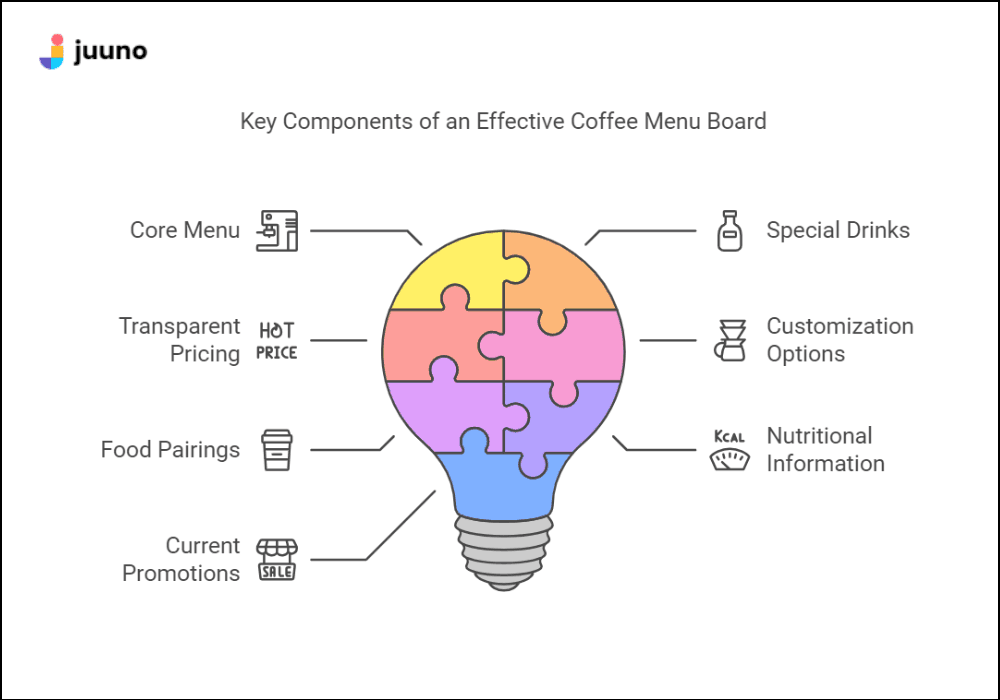
A strong coffee shop digital menu covers the essentials while making it easy for customers to scan and decide. Each section should have a clear purpose.
Core menu
This is the foundation. List your main drinks like espresso, cappuccino, and lattes. Keep this section consistent so regular customers can find their usual order quickly.
Special drinks
Use this space to highlight seasonal or unique items. Limited-time offers create interest and encourage customers to try something new.
Transparent pricing
Make prices clear and easy to read. This avoids confusion at the counter and helps customers make decisions faster.
Customization options
Show milk choices, syrups, and size options. Customers expect flexibility, so make it easy to see how they can tailor their drink.
Food pairings
If you offer snacks or pastries, suggest combinations. This can increase order value without adding complexity.
Nutritional information
Include key details like vegan or gluten-free options where relevant. This helps customers make informed choices.
How to set up a coffee shop digital menu (step-by-step)
Setting up a coffee shop digital menu is straightforward, but the details matter. The goal is not just to get something on a screen. It is to create a menu that works in a real café environment.
Step 1: Research and plan
Start by understanding your customers and how they order. Look at your busiest times and your most popular items. Decide what needs to stand out and how your menu should be structured.
Step 2: Design your menu
Create a layout that matches your brand and is easy to read from a distance. Keep it simple and focus on your core items. Use clear sections so customers can scan quickly.
Step 3: Write clear descriptions
Keep descriptions short and useful. Highlight what makes each item appealing without adding too much text. The goal is to guide decisions, not overwhelm.
Step 4: Use a content management system
A CMS allows you to update your menu quickly and manage what appears on each screen. This is what makes a digital menu flexible and easy to maintain.
Step 5: Test visibility in your space
Check how the menu looks from where customers stand. Make sure text is readable and important items are easy to spot. Adjust as needed before going live.
Step 6: Iterate and improve
Your menu is never finished. Update it regularly based on what sells, what customers respond to, and how your café operates day to day.
Hardware and setup: what actually matters
The hardware you choose has a direct impact on how reliable your coffee shop digital menu is. Not all setups are equal, and this is where many cafés run into issues.
At a basic level, you have two options. You can run your menu on a smart TV using its built-in browser, or you can use a dedicated media player connected to the screen. Both can work, but the key difference is how stable they are day to day.
Simple setups are often the best place to start, especially for smaller cafés. You do not need complex or expensive hardware to get up and running. What matters is choosing a setup that is consistent and easy to manage.
Reliability should be your priority. A menu that goes offline or glitches during peak hours creates friction and reflects poorly on your brand. In many cases, this comes down to using the right playback method rather than the most expensive setup.
Placement also matters. Screens should sit at eye level or slightly above, with clear visibility from the ordering area. Avoid glare from windows or lighting that makes the menu hard to read.
Keep your setup simple, but make sure it is dependable. The best setups are the ones that just work, every day.
Choosing the right coffee shop digital menu software
Menu display software lets you turn any smart TV or device into a digital menu. Choosing the right menu display software is key to making your digital menu easy to manage and update.
Focus on the features that actually matter. You should be able to update your menu remotely, schedule content for different times of day, and use simple templates to build your layout. These are the tools you will use every week, not just during setup.
Ease of use is critical. If the software feels complicated, you will avoid making updates. That leads to outdated menus and missed opportunities.
This is where platforms like Juuno stand out. It keeps things simple, so you can launch quickly and manage your screens without friction. You can run it across different devices, and your content continues to play even if your internet connection drops.
Some tools offer more advanced features, but most coffee shops do not need them. Choose software that fits how you actually work. The easier it is to use, the more value you will get from your digital menu.
Ready to upgrade your coffee shop with a digital menu? Juuno makes it easy.
Frequently asked questions (FAQs)
How much does a digital menu cost?
Costs vary depending on your setup. Most cafés pay for a screen and a software subscription. Many tools fall in the range of a low monthly fee per screen, which often replaces ongoing print costs.
What hardware do I need?
At a minimum, you need a screen such as a smart TV. You can also use a dedicated media player for better reliability. The right choice depends on how stable you want your setup to be.
Can I update my menu in real time?
Yes. Digital menus allow you to make changes instantly. You can update prices, add items, or promote offers without waiting or reprinting anything.
Do digital menus increase sales?
They can. Clear layouts and strong visuals help customers decide faster and notice featured items. This can lead to more add-ons and higher-value orders.
What is the biggest mistake to avoid?
Overcomplicating the menu. Too many items or too much design makes it harder to read. Keep it simple and focused so customers can order quickly.


Thomas leads Juuno's backend — the unglamorous engineering that keeps 10K+ screens running across 128 countries without phoning home at 3am. A full-stack developer who's spent his career in the trenches at startups, advertising agencies, and creative boutiques — quietly fluent in whatever stack the moment requires. Based in Laguna Beach.
