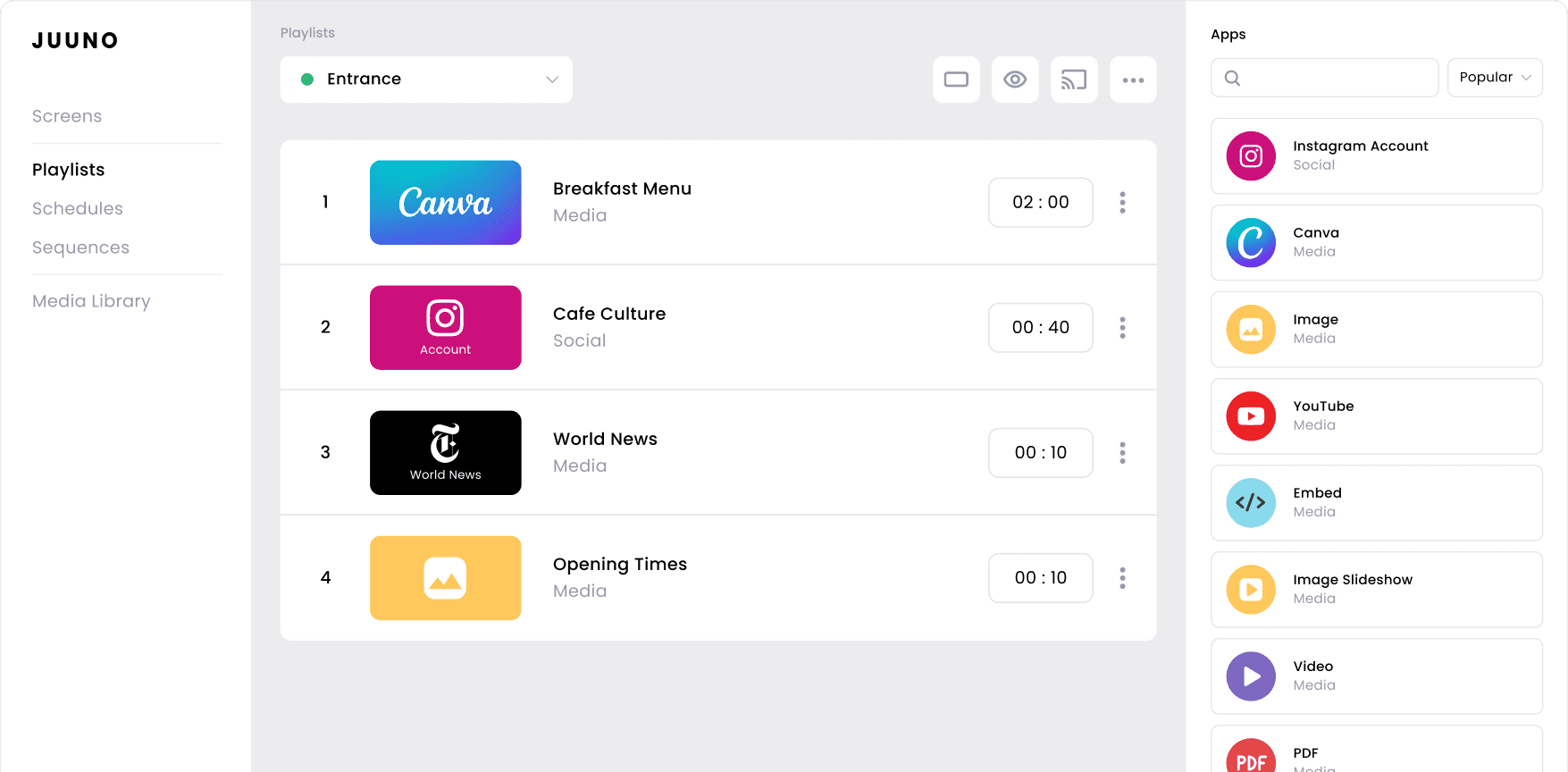
Used across 10,000+ screens in offices, cafes, gyms, schools, and retailers worldwide

Content & Playlists
Build playlists in minutes, not hours
Drop content into a playlist, set the order, and let it rotate. Juuno handles the rest — no design skills or technical knowledge required.
Unlimited playlists
Create as many playlists as you need — no caps, no per-playlist fees.
Scene-by-scene duration
Set each slide's display time independently — 5 seconds or 5 minutes
Playlist preview
QA your playlist before it goes live — preview directly in the browser.
Assign to screens in bulk
Push a playlist to 1 or 100 screens from a single modal.
Fallback content
Set a fallback playlist for off-schedule hours — your screens never go blank.
Duplicate across workspaces
Clone a playlist into another client workspace in one click
Media Library
Upload, browse, and reuse images, videos, and PDFs across all playlists.
Auto video transcoding
Upload any video format — Juuno converts it automatically for smooth playback.
PDF slideshows
Upload a PDF deck and it splits into individual pages, ready to play as a slideshow.
30+ Content Apps
Show anything — social feeds, dashboards, documents, and more
Social & Reviews


Design and Documents












Need something that doesn't exist yet? Build it.
Enterprise customers can work with us to build custom content apps tailored to your exact data source, internal tool, or workflow. And soon — you'll be able to build your own apps directly using our developer API, no agency required.
Scheduling
Show the right content at exactly the right time
Juuno's scheduling goes beyond on/off timers. Set different content for breakfast, lunch, and evening — every day of the week, down to the minute.

Weekly schedule grid
Drag time slots across a day-of-week calendar. Any playlist, any slot.
Sequences
Cycle through multiple playlists within a single time block — variety without complexity.
Schedule groups
Bundle schedules and apply them to multiple screens at once.
Per-schedule timezone
Essential for multi-location fleets — each location runs its own schedule in its own timezone.
Copy schedule
Re-use a day's setup for other days with a custom day selection.
Fallback playlist
Set what plays when no schedule slot is active — no black screens.
Sequences & Global Playlists
Head office controls the global playlist.
Local venues control the rest.
Sequences let you define a fixed rotation — set at the top and pushed to every screen across every location. Perfect for franchises, retail chains, and multi-site operators who need brand consistency without giving every venue full control. Read a franchise use case for more detail.

Built for franchises, retail chains, and multi-site operators
Whether you're running 3 locations or 300, Sequences and Global Assets mean brand compliance happens automatically — not through a policy document nobody reads. Head office ships the brand; venues run the screens.
Sequences
An ordered rotation of playlists that loops automatically. Define it once at the top, push it everywhere. Venues can't override it — they can only add local content alongside it.
Global Assets library
Brand assets — logos, videos, product images — stored centrally and visible across every workspace. Local venues can use them but can't delete or replace them.
Workspaces with role separation
Each venue lives in its own workspace. Head office admins see all workspaces; venue staff see only their own. No accidental cross-location edits.
Sequences within schedules
Embed a sequence inside a schedule time slot — so the global rotation plays during trading hours while local content takes over after close.
Cross-workspace playlist duplication
Push a playlist from head office into any location workspace instantly — no rebuild, no file transfer.
Roles that enforce the hierarchy
Head office admins. Venue staff get Creator or Screen Admin roles — they manage their screens and local content, nothing above their level.
Multi-zone Displays
One screen, multiple content zones
Divide any screen into independent zones — each playing different content simultaneously. Menu board in the main zone, social feed in the corner, live news ticker at the bottom. You can see it in a real deployment.

Split-screen zones
Divide any screen into independently controlled content areas — each zone plays a different app on its own schedule.
Per-zone scheduling
Each zone can follow its own playlist rotation — no need to rebuild your layout when one zone's content changes.
Zone-compatible apps
Most content apps work inside zones — video, image, YouTube, social feeds, news, weather, and more.
Mix content types
Combine your menu board with a live Instagram feed, a news ticker, and a weather widget — all on the same screen at the same time.
Screen Overlays
Always-on layers that sit above your content
Overlays are persistent elements that float above your playlist — no matter what's playing underneath. Set them once and forget them. They're always there.
Clock overlay
A live clock on top of any content — always visible regardless of what's playing.
Weather overlay
Live local weather and forecast layered over your main content.
Announcement overlay
Scrolling ticker or static message — update from the dashboard instantly, no playlist edit needed.
Image overlay
Persistent logo, watermark, or graphic pinned to a corner. Stays on across every piece of content.

Screen Management
Manage every screen remotely — no onsite visit required
Add a screen in minutes with a 6-digit pairing code. Then control everything from the dashboard — from anywhere.
4-digit screen pairing
Plug in a device, enter the code shown on screen — done. No IP addresses, no network config.
Remote restart
Kick a frozen screen back to life without touching it — one click from the dashboard.
Remote display power on/off
Turn the TV off at closing time, on at opening — scheduled or manual.
Force content refresh
Push edits live — don't wait for the next poll cycle.
Screen groups
Organise screens into folders by location, floor, or zone. Manage at scale.
Device info panel
See memory, CPU, OS, and player version for every screen — diagnose without a site visit.
Portrait & landscape
Switch orientation from the dashboard — no physical re-mounting required.
Power schedule
Set daily on/off times per screen — saves energy and extends hardware life.
Hardware
Works with hardware you already own
No proprietary player required. Juuno runs on Amazon Fire devices, Android, Chromecast, and web browsers. Add a screen in 5–10 minutes. Compatible with the Amazon Signage Stick.




Team & Permissions
Invite your whole team with no per-seat charges. Assign roles so each person sees only what they need to see.

White Label & Agency
Resell Juuno as your own product
The white-label plan gives you a fully branded digital signage platform — your logo, your domain, your pricing. Your clients never see Juuno. For example, see how Hexx Design Co runs 20 screens at 75% margin. See our full white-label breakdown for more.
Custom branding
Your logo, brand colors, and favicon throughout the app.
Custom app domain
signage.youragency.com — DNS-verified, fully owned.
Custom email domain
Invites and notifications sent from your domain (DKIM/SPF/DMARC).
Custom support link
Replace Juuno's support with your own contact or chat widget.
Branded player downloads
Installer files with your branding for your clients.
Client management
Manage all client accounts under a single admin login.
Workspaces
Hard-partitioned sub-accounts per client — separate screens, assets, users.
Set your own pricing
Charge what you want — Juuno charges you $100/month flat.
Frequently asked questions
Can Juuno run multi-zone displays on Amazon Signage Sticks?
Yes. Juuno's multi-zone display feature splits a single screen into independent content areas — video in one zone, a menu in another, social feed in a third — and it runs natively on Amazon Signage Sticks (as well as Fire TV Sticks, Android boxes, Chromecast, and Raspberry Pi). No extra hardware needed. See our full player compatibility list.
Can I control what a franchise venue can and can't edit?
Yes. With Juuno's Sequences and Global Playlist features, head office keeps control of the brand content (promotions, campaigns, compliance messaging) while individual venues manage their own local content within a defined slot. Permissions are set per workspace, so a barista at one café can't overwrite the corporate schedule.
How much margin do agencies make reselling Juuno as a white-label product?
Juuno’s white-label resellers typically run 67–75% gross margins depending on their tier and how they package hardware, install, and support. Base cost is $5 per screen per month; you set your own retail price. See the white-label page for full margin breakdowns and case studies. Curious how we stack up? See how we compare Juuno to OptiSigns.