I've talked to enough Yodeck users to know their complaints follow a pattern. It's almost never the software itself, it's the Raspberry Pi sitting behind the TV that eventually causes the headache.
Yodeck is good. 4.9/5 on G2, 4,400+ reviews, a generous free tier, and affordable paid plans. If it's working for you, this page probably isn't worth your time.
But if you're searching "Yodeck alternatives," it's almost always for one of three reasons:
The Raspberry Pi setup is wearing thin. SD card re-imaging when WiFi drops, occasional player flakiness at scale, and the cumulative weight of managing per-screen hardware across a multi-site rollout.
Scheduling is taking too many clicks. A theme in recent Capterra and G2 reviews — what's fine for one screen gets tedious when you're updating menus across 15 locations daily.
Some integrations don't behave. Cloud storage sync delays, weather/traffic widgets that occasionally stop, and timezone-driven support response gaps.
Below are the five alternatives that solve those specific problems. On our own platform, 69% of screens already run with zero dedicated hardware—a big part of why Raspberry Pi frustration is the #1 reason people land on this page.
This is a switching guide, not an introduction to digital signage. For a broader look at the market, see our digital signage software guide.
Worth knowing before you compare pricing: on April 1, 2026, Yodeck raised its Premium and Enterprise plans by $1 per screen per month (Premium moved from $11 to $12, Enterprise from $15 to $16), while Basic stayed at $8. That shift doesn't change what Yodeck does well, but it does change the math for anyone weighing the cost comparison below.
If you want the shortest answer: Juuno is browser-based (no Pi), $5 per screen per month, and built around a Canva-first design workflow. Start a free 7-day trial — no credit card.
Yodeck users' core frustrations (and what to look for in an alternative)
Yodeck's strengths and weaknesses come from the same design choice: dedicated Raspberry Pi players. That's what gives it offline reliability, predictable performance, and the famous free-Pi-with-annual-plan offer. It's also the source of every complaint that rises to the top of recent reviews.
Look for an alternative that fixes:
Yodeck friction | What to look for |
|---|---|
Per-screen Raspberry Pi to manage | Browser-based playback (smart TV browser or HDMI stick) |
SD card re-imaging when WiFi drops | Stateless device pairing (no SD card to corrupt) |
Multi-click scheduling for daily updates | A scheduler designed around recurring dayparts and templates |
Slow cloud-storage sync | Native Canva or design-tool integration that pushes updates instantly |
Built-in widgets that occasionally stall | Battle-tested widgets — or just an iframe widget for a known-good public URL |
Support timezone gaps | Provider in your timezone (or 24/7 for paid plans) |
I've had three separate calls this year with businesses on Yodeck's Enterprise plan asking about the price bump, and it's never really about the dollar. It's the signal that predictable pricing wasn't actually a guarantee. When someone's already annoyed about re-imaging an SD card, a surprise invoice is what tips them into shopping around.
"The pattern I see in support tickets is pretty consistent: someone's Pi drops off WiFi, they re-image the SD card, and it happens again three months later at a different location. It's not that the hardware is bad, it's that it's one more thing that can fail between the content and the screen." — Mike Hill, CEO and Co-founder of Juuno
The five alternatives below score on these in different ways. Pick the one that matches your specific Yodeck pain.
What Yodeck actually costs at scale (and what Juuno costs instead)
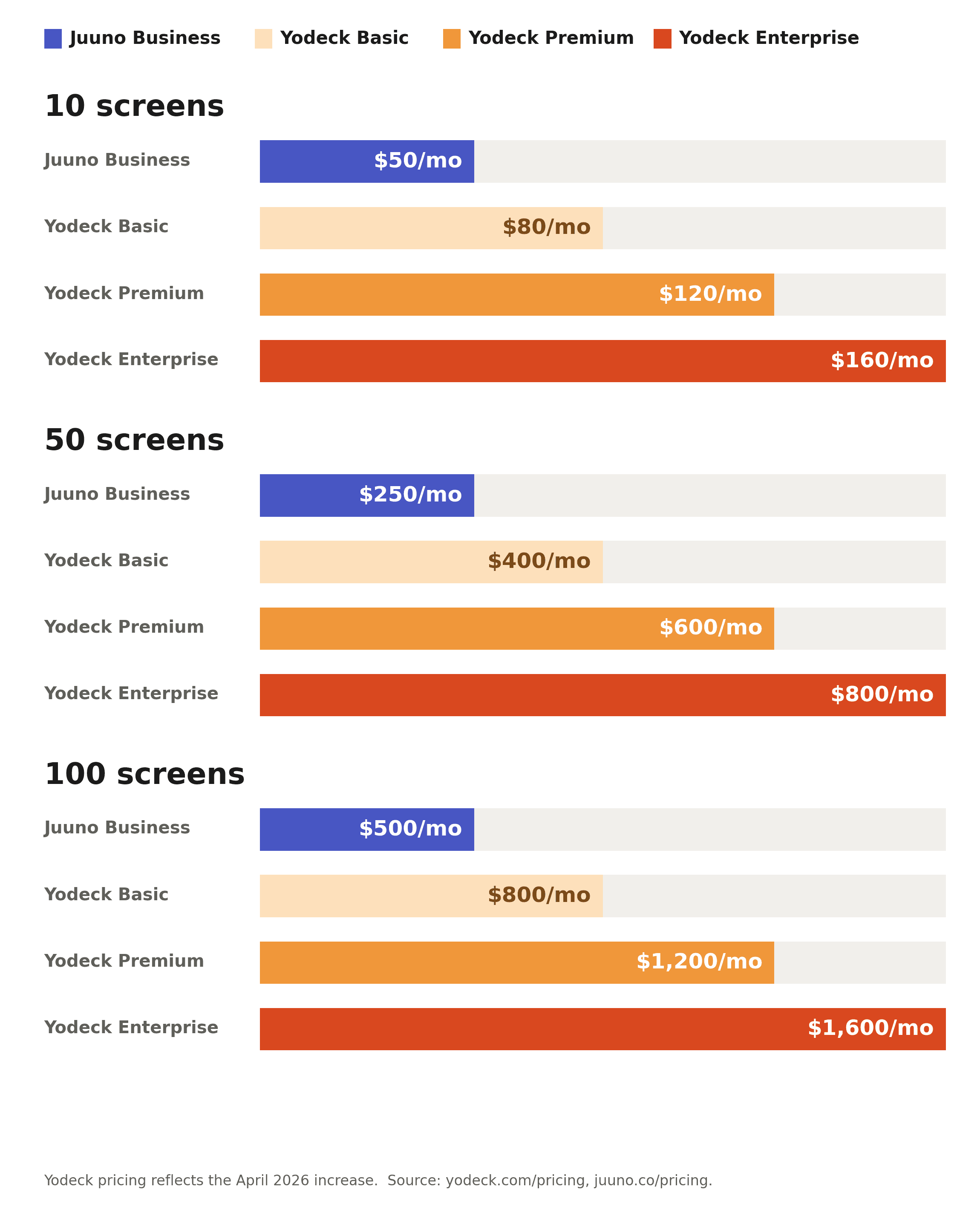
Most pages ranking for this term quote a single "starting at" number and stop there. That hides how fast the gap widens once you're past a handful of screens, especially now that two of Yodeck's three paid tiers just went up. Here's the same comparison at three screen counts, using Yodeck's current 2026 pricing and Juuno's Business plan.
Screens | Juuno Business ($5/screen) | Yodeck Basic ($8/screen) | Yodeck Premium ($12/screen) | Yodeck Enterprise ($16/screen) |
|---|---|---|---|---|
10 | $50/month | $80/month | $120/month | $160/month |
50 | $250/month | $400/month | $600/month | $800/month |
100 | $500/month | $800/month | $1,200/month | $1,600/month |
If you're running Juuno's White Label plan instead ($100/month base, 20 screens included, $5/screen after that), the totals above land in the same place at 50 and 100 screens. The math is identical past the first 20 screens either way.
One caveat, in fairness to Yodeck: its annual plans include a free Raspberry Pi player per screen, worth roughly $79 to $129 depending on the tier. A Yodeck customer on monthly billing who buys their own Pi hardware will pay somewhat more than the table above shows. Juuno's comparable cost is the TV's own browser (free) or a one-time $99 Amazon Signage Stick per screen if the TV doesn't have one.
When we built Juuno's pricing, I didn't want a plan that penalizes you for growing, so it stays flat per screen whether you're adding your third TV or your three-hundredth. I've watched too many businesses get stuck recalculating their signage budget every time they added a location.
1. Juuno: Best all rounder

Pricing: $5/screen/month (Business), $9/screen/month (Growth), White Label from $100/month. 7-day free trial, no credit card.
Why it's the strongest like-for-like swap:
Juuno is the closest in spirit to what Yodeck started as — a simple, affordable signage tool you can set up without a meeting with sales. The big difference is the hardware path. Juuno runs in any modern smart TV's browser, on a $99 Amazon Signage Stick, or on a Chromecast. There's no Raspberry Pi to image, no SD card to corrupt, and no per-screen hardware budget.
Juuno's pricing is below Yodeck's paid tiers across the board ($5–$9 vs $8–$15). According to our data, the average account runs just 2.1 screens, so most switchers are looking at single-digit monthly savings that still add up fast at scale.
Our Canva integration is native. Designs sync from Canva directly, so updating a menu or specials board takes two clicks instead of five.
"Yodeck's dashboard apps are genuinely good, but they sit behind a plan upgrade. We built the Canva sync into every tier because most businesses just want their existing design workflow to reach the screen, not a new one to learn." — Darren Cummings, Co-founder, Design, Juuno
69% of screens on Juuno's platform run through a browser with no dedicated hardware at all, which is exactly the setup this section is describing.
Scales with you. The Business plan ($5/screen) handles single-location and small multi-site setups. The Growth plan ($9/screen) adds API access and proof-of-play reporting for teams that need audit trails. White Label ($100/month base, 20 screens included) is built for agencies, resellers, and large enterprise rollouts running screens across many locations or business units. Whether you're one café or a multinational running 1,000+ screens across regions, the platform scales without forcing you onto an enterprise-only contract.
What you trade off versus Yodeck:
No free single-screen plan. Juuno's lowest is $5/month. If you specifically need free, Yodeck still wins on that one.
Smaller template library. Yodeck has 500+ templates; Juuno leans on Canva's 7,000+. Different model — if you're already a Canva user, Juuno's approach is faster. If you'd rather pick from a built-in library and never see Canva, Yodeck's library is denser.
Smaller user base. Yodeck has more active screens, while Juuno is smaller. That mostly matters for community-shared templates and integrations. It doesn't affect uptime.
Trustpilot: 4.6/5.
2. OptiSigns: Best for retail and interactive kiosks
Pricing: $10–$45/screen/month.
OptiSigns is what you choose when your use case has outgrown Yodeck's simplicity but isn't enterprise. It runs on Fire TV, Android, ChromeOS, and the smart TV browser — same browser-based path as Juuno, but with a deeper feature set. Touchscreen kiosk support, proof-of-play, uptime monitoring, more granular roles.
The trade: more crowded UI, more pricing tiers to navigate, and a higher price than Yodeck unless you're committing to annual.
Best for: retailers running interactive kiosks, multi-location operators that need uptime monitoring across 20+ screens.
3. NoviSign: Best for schools and mid-market with diverse content needs
Pricing: $18–$44/screen/month. 30-day free trial.
NoviSign is more expensive than Yodeck or Juuno, but if your problem with Yodeck is "the integrations aren't quite right" rather than "the hardware is annoying," NoviSign's POS, Toast, Zapier, Power BI, and API integrations are deeper than most. 4.9/5 G2.
The catch: $44/screen/month for the Premium tier with a 20-screen minimum is enterprise pricing. For an SMB that just wants reliable signage, this is overkill.
Best for: schools, public sector, mid-market companies needing audited integrations.
4. Look Digital Signage: Best for clean editor under $15/screen
Pricing: $13.50/screen/month.
Look (yes, that's the name) sits between Yodeck and OptiSigns on price and has one of the better design editors in the category. Single tier, predictable, includes offline playback and uptime monitoring. Smart TV browser plus most major media players supported.
If you want a single-tier alternative without the Pi commitment and don't need Juuno-level pricing, Look is a solid pick.
Best for: designers who want better in-platform editing tools.
5. ScreenCloud: Best for centrally-controlled approval workflows
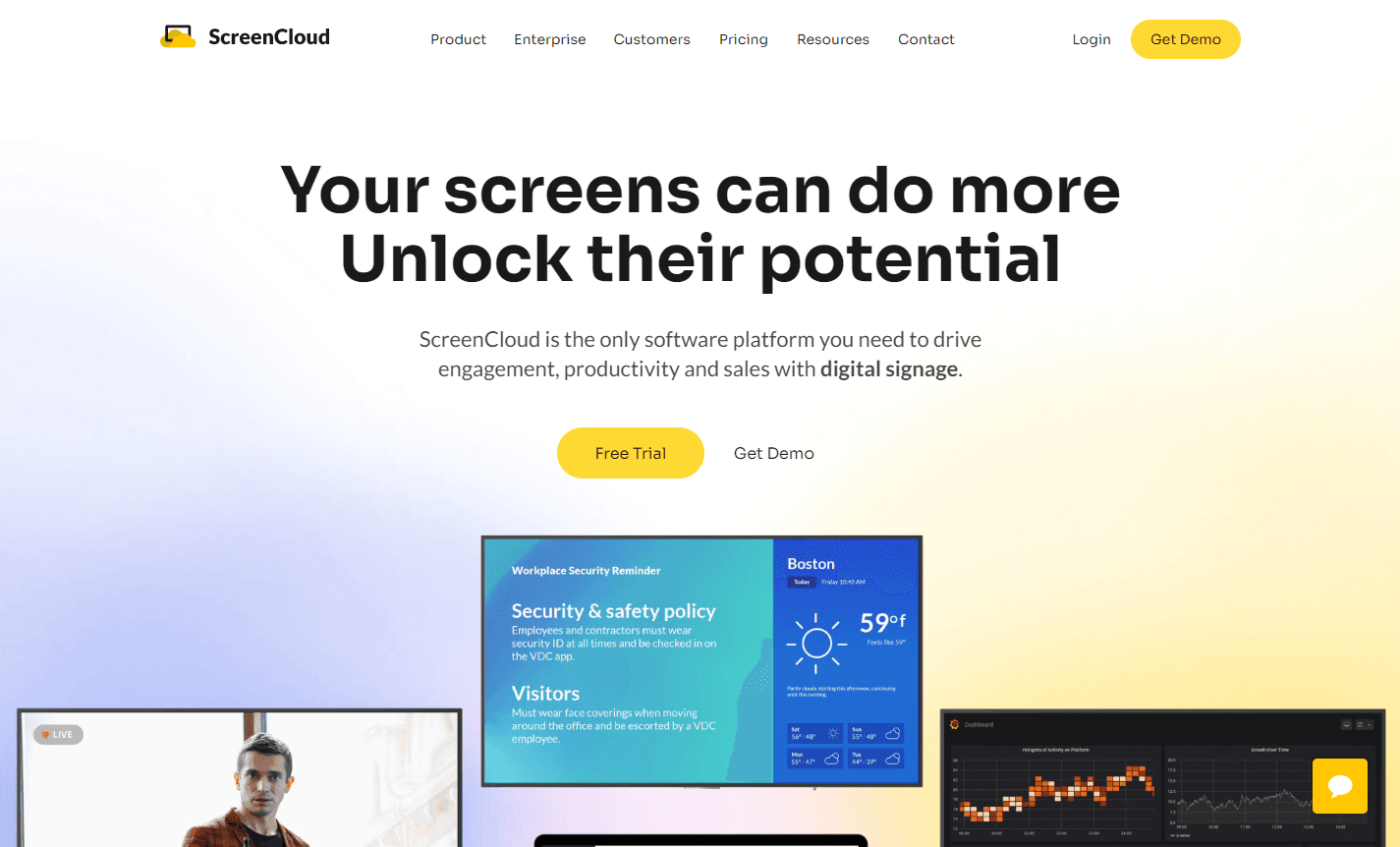
Pricing: $20–$30/screen/month. Enterprise from 25-screen minimum.
ScreenCloud is the strongest pick if your specific need is multi-tenant accounts and brand-approval gating — features built for content governance teams. It's 2–4× the price of Yodeck or Juuno, but those workflows are why.
If your concern is governance and centralised approvals — not screen count itself — ScreenCloud may be a fit. Juuno's Growth ($9/screen) and White Label ($100/month base) plans handle large-scale multi-location deployments without the same overhead, so screen count alone isn't a reason to default to ScreenCloud. Learn more in our guide to ScreenCloud alternatives.
Best for: companies whose primary requirement is multi-tenant approval workflows.
Side-by-side comparison
Feature | Juuno | OptiSigns | NoviSign | Look | ScreenCloud | Yodeck |
|---|---|---|---|---|---|---|
Per screen / month | $5 to $9 | $10 to $45 | $18 to $44 | $13.50 | $20 to $30 | $0 to $16 |
Free tier | 7-day trial | 14-day trial | 30-day trial | Trial | Trial | 1 screen free |
Hardware | Browser / Signage Stick | Browser / FireTV / ChromeOS | Browser / various | Browser / media player | Browser / proprietary | Raspberry Pi |
Canva integration | Native | Yes | Yes | No | Yes (clunky per reviews) | No |
Touchscreen kiosks | Limited | Yes | Yes | Limited | Yes | Limited |
API / proof-of-play | $9 plan | Yes | Higher tiers | Yes | Yes | Premium |
Recent reviews flag | Smaller user base | Crowded UI | Higher price | Fewer integrations | Cost; FireTV bugs | Pi hardware |
My quick recommendation
Switching from Yodeck because of Raspberry Pi hassle: Juuno.
Outgrowing Yodeck — need touchscreen kiosks or proof-of-play: OptiSigns (or Juuno Growth at $9/screen for proof-of-play).
Want deeper integrations (POS, Power BI, API): NoviSign or Juuno Growth (API access).
Want a polished single-tier editor: Look.
Need multi-tenant brand-approval workflows: ScreenCloud.
Multi-location enterprise with central marketing/IT: Juuno White Label.
For most readers of this page — at any scale, from a single screen up to multi-thousand-screen rollouts — Juuno is the closest match to what made Yodeck appealing in the first place. Same simplicity, lower cost, no SD cards.
A 30-minute migration plan from Yodeck to Juuno
I always tell people migrating from Yodeck to move one screen first, not all of them. I've seen too many teams try to switch everything in a weekend and end up frustrated by a playlist quirk that would've taken five minutes to catch on a single test screen.
If you decide to switch, here's the path:
Sign up at juuno.co (no credit card, 7-day trial).
Pick one Yodeck screen to migrate first. Don't do all of them at once.
In Juuno, recreate that screen's content — upload your existing images/videos or pull from Canva. Most Yodeck users find Canva-sourcing faster than the Yodeck-export-to-import workflow.
Pair the TV — if it's a smart TV, open the TV's browser to the Juuno pair URL. If it's currently running on a Yodeck Pi, you can either repurpose the Pi by installing a browser image or replace it with a $99 Amazon Signage Stick.
Run both side-by-side for a week. Watch for any content that doesn't render right.
Migrate the rest.
Cancel Yodeck at the end of your billing cycle.
A five-location coffee chain running Yodeck's Premium plan switched to Juuno in early 2026 after a Raspberry Pi failure took down two menu boards during a Saturday rush. The owner migrated one screen first, ran it alongside the existing Yodeck setup for four days, then moved the remaining four locations over a single weekend. The chain now runs its daily specials and drink menus entirely through Canva, with no dedicated hardware beyond an Amazon Signage Stick at the two older locations without a smart TV browser.
Most teams complete a 5–10 screen migration in a weekend.
Frequently asked questions
Did Yodeck actually raise its prices in 2026?
Yes. On April 1, 2026, Yodeck raised its Premium plan from $11 to $12 per screen per month and its Enterprise plan from $15 to $16. The Basic plan stayed at $8. The increase applies to both monthly and annual billing, though annual customers keep their current rate until renewal. If you're deciding whether to stay or switch, the price table earlier in this article shows what that actually adds up to at your screen count.
Is the Yodeck Raspberry Pi useful for anything else after switching?
Yes — it's a generic Raspberry Pi. You can re-image it as a regular media player, a home automation hub, or a small dev box. Or stick it in a drawer.
Will my existing Yodeck content work on Juuno?
Static images, video files, and PDFs all transfer directly. Yodeck-specific apps (their built-in widgets) don't, but Juuno has equivalents for the common ones (weather, RSS, social, calendar).
What about my Yodeck scheduling? Will I have to rebuild it?
Yes, scheduling is platform-specific. The good news: Juuno's scheduler is dayparting-first, so if your schedule is "breakfast → lunch" or "weekday → weekend," it's faster to set up than Yodeck's.
Is Juuno really cheaper at every screen count?
At 1 screen, Yodeck is free and Juuno is $5. Past 1 screen, Juuno is cheaper at every count (Yodeck Basic is $8, Juuno Business is $5).
Can I keep using my existing screens?
Yes. Smart TVs work directly. Older TVs need a $99 Signage Stick. Yodeck Pis can either be re-imaged or replaced.
Can Juuno handle a 500+ screen enterprise deployment?
Yes. The Growth plan ($9/screen) adds API access and proof-of-play reporting for audit trails, and the White Label plan is designed for centralised marketing teams, agencies, and resellers running screens across many locations or business units. There's no enterprise-only contract gating — the same browser-based architecture scales from one screen to thousands.
The shortest path
For most readers of this page, Juuno is the best digital signage software for small businesses switching off Yodeck's hardware. Start a free 7-day trial →


Matt leads Juuno's frontend — including the browser-based architecture that lets any smart TV become a digital sign without a media player. Full-stack developer with 10+ years building websites, mobile apps, and games. Obsessive about animation, typography, and interaction states — the details you notice only when they're missing. In his words: "Technology has my head, but design and movement have my heart." Also writes for the Juuno blog. Based in Brisbane.
