The Rise Vision alternative that’s easier to use & more affordable

Organizations that trust Juuno










Designed for simplicity, built for the real world

Get up and running fast
Juuno is built for non-tech users. If you can click, you can launch a display. The setup is quick, intuitive, and requires zero training—perfect for busy schools, offices, or teams without a dedicated IT department.
One platform, every player
Juuno works with the devices you already have. From smart TVs with a media stick to Android TV boxes and our own Juuno Player, you’re never locked in. Choose the setup that fits your space and budget, and manage every screen from one simple dashboard. It’s digital signage without the hardware headaches; just plug in, connect, and go.


Manage different sites with workspaces
Whether you're running multiple schools, campuses, departments, or locations, Juuno’s workspaces keep everything organized. Assign users to specific sites, manage unique content per group, and avoid mix-ups. It’s the easiest way to scale signage across diverse teams or places.
Automate your signage with playlists and schedules
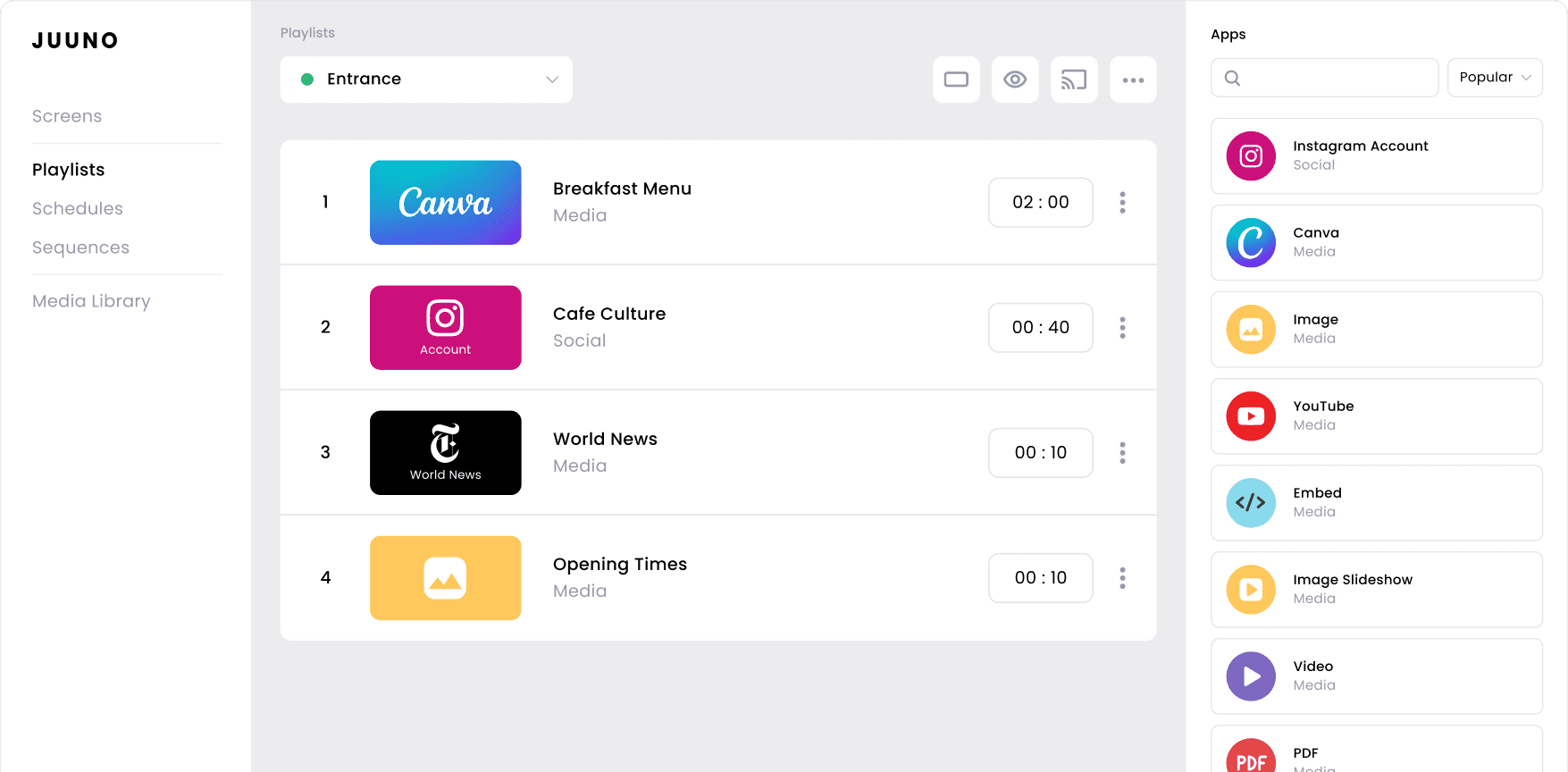
Set it and forget it. Juuno lets you schedule content to play at specific times, days, or seasons. From lunch menus to event reminders, your screens update automatically so you never have to manually swap out content again.





Smart tools to keep your digital signs running smoothly
Live Content Feeds
Keep screens fresh with real-time content like weather, news, or social media. Auto-updating feeds ensure your signage stays relevant without constant manual updates.
Role-Based Permissions
Control who can edit what. Assign roles to staff, teachers, or managers so they can manage their own content without affecting other screens or locations.
Multi-Screen Control
Easily manage multiple screens from one dashboard. Update content across classrooms, campuses, or departments in seconds. No need to log in to each screen separately.
Looping Videos & Slideshows
Play videos or slideshows on repeat for welcome messages, branding, or training. Perfect for lobbies, waiting rooms, or highlighting announcements throughout the day.
Real-Time Meeting Schedules
Display live meeting room availability and daily schedules by syncing with Google Calendar. Keep teams organized and avoid double-booking with up-to-date info on every screen.
Excellent Customer Support
Get fast, friendly help from real people. Our team is ready to assist via chat or email with clear answers, helpful guidance, and quick solutions.





Frequently asked questions
How is Juuno different from Rise Vision?
Juuno is a simpler, browser-based alternative to Rise Vision that’s perfect for schools, small teams, and non-technical users. It runs on any smart TV, with no media players or hardware required. At just $20/screen, Juuno is budget-friendly without sacrificing key features like scheduling, playlists, and remote updates. Plus, setup takes minutes, and customer support is fast, friendly, and human. You can choose to use our web browser signage, or connect via Chromecast, Android App, Amazon Firestick App, Amazon Signage Stick, or Rasperry Pi.
Does Juuno work well for schools and universities?
Yes, Juuno is ideal for K–12 schools, districts, and universities. Use it to display announcements, lunch menus, events, or emergency alerts across classrooms, hallways, and campuses. With remote updates, workspaces for different sites, and easy scheduling, staff can manage screens without IT support. Juno helps keep students and faculty informed in real time.
Can small businesses use Juuno for digital signage?
Absolutely. While Juuno is built with the management tools schools and universities need, it’s also a great fit for small businesses. Cafes, gyms, clinics, and offices use Juuno to display menus, promotions, announcements, or other branding. It’s simple, affordable, and flexible enough to scale as your business grows.
How do the content playlists and schedules work?
Juuno lets you automate what plays and when using simple playlists and schedules. Just create content playlists—like calendars, announcements, or widgets—and assign them to specific days or times. Whether it’s switching from lunch to dinner menus or weekday to weekend content, Juuno ensures the right message plays at the right moment, with no manual updates needed.
Will teachers and staff be able to update signs?
Yes. With Juuno, you can assign specific permissions to teachers, staff, or admins based on your needs. Create separate workspaces for each school, department, or location, and give access to only the people responsible for those screens. This way, staff can easily update content without affecting other displays, keeping things organized, secure, and perfectly tailored to your setup.
What kind of content can I display?
Juuno supports images, videos, slideshows, social media feeds, calendars, announcements, weather widgets, and more. Schools use it to share lunch menus, event reminders, and student shoutouts. Offices display team updates, safety info, and KPIs. With Canva integration and playlists, it’s easy to keep content fresh, relevant, and tailored to your audience.
How much does Juuno cost?
Juuno starts at just $5 USD per screen/month for the Business plan, which includes unlimited users, playlists, and access to all apps. Need more? Our upcoming Growth and Enterprise plans will offer advanced features like reporting, API access, and remote device management. We also offer custom enterprise pricing with SLAs and dedicated support. Just reach out to learn more. If you want to compare the costs of multiple alternatives, you can check out our write-up on the best digital signage software.
Can I manage multiple campuses or departments?
Yes, Juuno makes it easy to manage digital signage across multiple campuses, schools, or departments. With workspaces, you can group screens by location or purpose and assign specific admins to each one. Our content management system lets you schedule, preview, and update content remotely across all screens, while user permissions ensure everyone only sees what they need to manage.
The Rise Vision alternative that meets all your needs for less
Ridiculously Easy to Use
Juuno is built for non-technical users. Teachers, office staff, and admins can update screens in minutes with simple, intuitive tools that just work. Pre-schedule your content or update it regularly.
Budget Friendly
At just $5 per screen per month, Juuno makes it easy to scale signage across classrooms, offices, and campuses without breaking your budget or adding hardware costs.
Built for School Life
Manage signage in classrooms, hallways, offices, or conference rooms. Use workspaces to separate locations or departments, and assign permissions so each team can manage their own content.