Most outdoor digital signage guides focus heavily on specs. They compare brightness levels, list IP ratings, and showcase expensive commercial displays. Very few talk about what actually happens after installation.
That is where outdoor signage projects succeed or fail.
In real-world deployments, I've seen that the biggest problems usually come from overheating, unstable networking, unreliable playback hardware, and content that becomes outdated after a few weeks. A screen can look perfect during setup and still become unreadable in direct sunlight by noon. A “smart TV solution” can work flawlessly indoors and then freeze repeatedly once deployed outside.
Outdoor digital signage requires more than a bright display. Reliability, visibility, environmental durability, content strategy, and operational simplicity all matter just as much as the screen itself.
This guide focuses on the lessons businesses learn after managing outdoor displays in the real world. No generic definitions. No spec-sheet filler. Just practical guidance on building outdoor signage systems that stay visible, stable, and easy to manage long term.
The outdoor digital signage checklist
After working through real-world outdoor signage deployments, I’ve found that success usually comes down to dozens of small operational decisions, not just the display itself. Brightness, heat management, networking, playback hardware, mounting, scheduling, and content design all play a role in long-term reliability. I put together this checklist to cover the most important factors businesses, schools, and organizations should evaluate before deploying outdoor digital signage.
Category | What to Evaluate | Recommended Standard | Common Mistake |
|---|---|---|---|
Brightness | Nits for environment | 700–1500 shaded, 3000+ sunlight | Buying indoor TVs |
Weatherproofing | IP rating | IP55/IP65 minimum | Ignoring ventilation |
Heat management | Direct sunlight exposure | Ventilated enclosure | Fully sealed cabinets |
Mounting | Wind/load support | Commercial outdoor mount | Cheap indoor brackets |
Networking | Outdoor WiFi strength | Dedicated AP or ethernet | Weak signal zones |
Media player | Playback stability | Fire Stick / Signage Stick / Android | TV browser only |
Software | Remote management | Cloud CMS with scheduling | Manual USB updates |
Content | Viewing distance readability | Large text + high contrast | Overdesigned layouts |
Scheduling | Daypart automation | Automated playlists | Static all-day content |
Maintenance | Cleaning + firmware | Quarterly checks | “Install and forget” |
Schools | Vandal resistance | Lockable enclosures | Exposed hardware |
Power | Surge/weather protection | Outdoor-rated power | Standard extension cables |
Cost planning | Total ownership | Include install + maintenance | Budgeting only for display |
Why brightness matters more than resolution outdoors
Outdoor digital signage buyers spend far too much time comparing resolutions and far too little time thinking about visibility. I’ve seen businesses invest in beautiful 4K displays that become nearly unreadable by midday because the screen simply cannot compete with ambient light.
Outdoors, brightness matters more than resolution almost every time.
The biggest mistake: prioritizing 4K over visibility
The “unreadable 4K” problem is incredibly common in outdoor signage deployments. A display can look razor sharp during installation and still fail in real-world conditions once direct sunlight hits the screen.
Higher resolution does not help if people cannot clearly see the content from a distance or during bright daylight hours.
For outdoor environments, readability should always take priority over pixel density. Large fonts, strong contrast, and sufficient brightness have a much bigger impact on performance than ultra-high resolution specs.
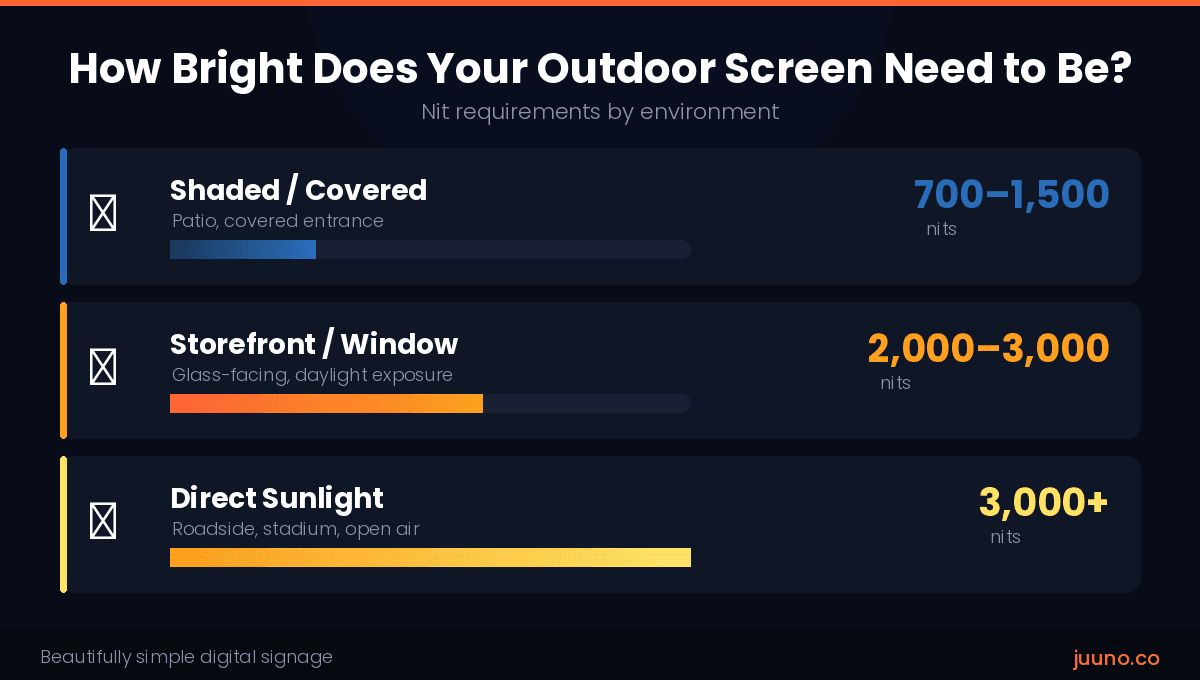
Recommended nit ranges by environment
Brightness requirements change dramatically depending on placement and lighting conditions.
Here’s the general guidance I recommend:
Shaded patios or covered outdoor areas: 700–1,500 nits
Storefront windows facing daylight: 2,000–3,000 nits
Direct sunlight exposure: 3,000+ nits
Roadside visibility: higher brightness combined with larger screen sizes and simpler content layouts
Storefront displays are especially tricky because the screen has to compete with both outdoor sunlight and reflections from the glass itself.
Roadside signage introduces another challenge entirely. Drivers only glance at the screen for a few seconds, so visibility and readability matter much more than ultra-crisp detail.
When LED signage becomes the better option
There comes a point where traditional LCD signage stops making sense outdoors.
For long viewing distances, high ambient light environments, sports fields, school campuses, and large public spaces, outdoor LED signage often performs much better. LED displays scale more effectively for large-format installations and maintain stronger visibility in demanding lighting conditions.
I usually recommend evaluating LED signage when people need to read content from significant distances or when sunlight becomes consistently aggressive throughout the day.
The goal with outdoor digital signage stays simple: people need to see the message immediately. Brightness is usually the deciding factor in whether that happens successfully.
The hidden reliability problem nobody talks about: playback hardware
Most outdoor digital signage conversations focus on displays, brightness, and weatherproofing. Very few talk about the playback hardware powering the content itself.
That is a problem, because playback reliability often determines whether an outdoor signage deployment succeeds long term.
Why TV browsers fail in production environments
TV browsers create a surprising number of problems in digital signage deployments. They may work perfectly during testing and then become unreliable once the screen runs continuously outdoors.
The most common issues include:
Random crashes
Firmware inconsistencies across TV brands
Autoplay failures
Memory limitations
Sluggish performance with video-heavy content
Outdoor environments make these issues even more frustrating because physical access to the screen may be difficult. A frozen display mounted outside a storefront or high above a drive-thru lane quickly turns into a maintenance headache.
I usually recommend treating TV browsers as temporary or lightweight signage solutions rather than long-term production infrastructure.
The hardware players that consistently perform best
Dedicated signage players almost always deliver more stable playback than native TV browsers.
Some of the most reliable options include:
Amazon Signage Stick
Amazon Fire Stick
Android signage players
Raspberry Pi deployments
Chromecast setups
These devices separate content playback from the TV’s operating system, which improves stability and makes updates easier to manage remotely.
The right player depends on the complexity of the deployment, but even affordable hardware players usually outperform built-in TV browser environments over time.
The simplest reliable signage stack for SMBs
For most small and medium-sized businesses, the best outdoor signage setup stays relatively simple:
A high-brightness commercial display
A dedicated signage player
A cloud-based CMS
Remote scheduling capabilities
Canva-based content workflows
This type of setup gives businesses flexibility without creating unnecessary operational complexity.
Platforms like Juuno support multiple playback options including Amazon Fire Stick, Android players, Chromecast, Raspberry Pi, web browsers, and Amazon Signage Stick deployments, giving businesses flexibility based on their environment and reliability needs. Combined with playlist scheduling and centralized content management, this makes it much easier to keep outdoor signage updated across one location or many.
Environmental durability: what actually destroys outdoor displays
Most outdoor display failures come from environmental stress, not the screen itself. Heat, moisture, poor airflow, and weak installation decisions quietly shorten the lifespan of outdoor signage systems long before the display officially “fails.”
Heat kills more displays than rain
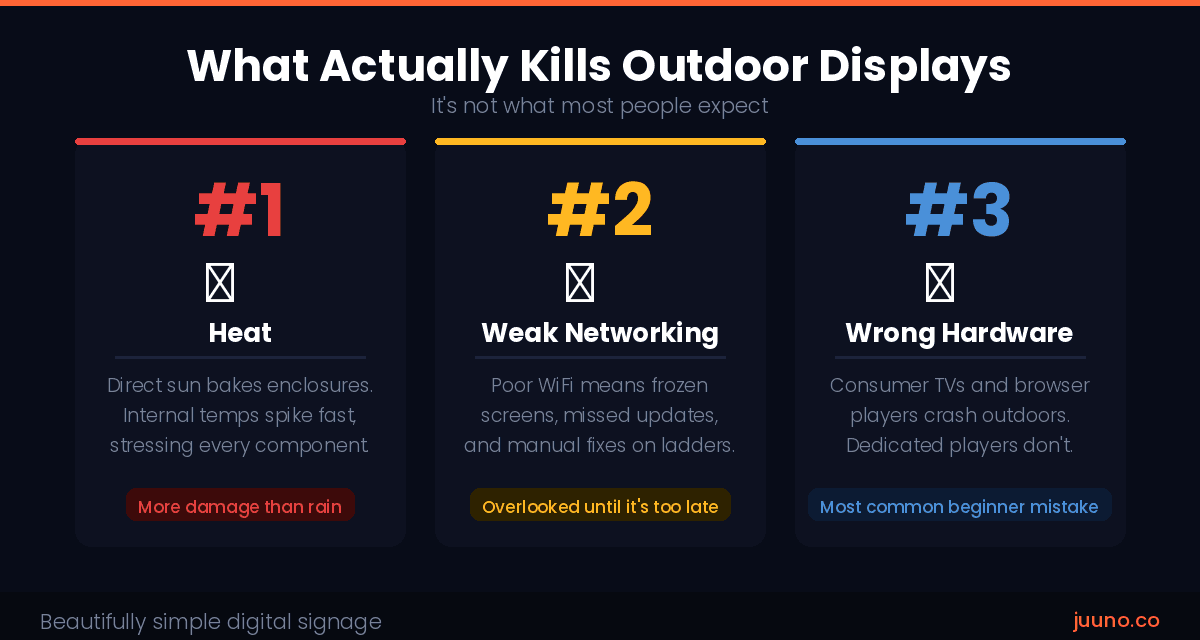
Rain gets most of the attention in outdoor signage conversations, but heat usually causes more long-term damage.
Direct sun exposure creates serious thermal buildup, especially inside enclosures with poor ventilation. Internal cabinet temperatures can rise quickly during summer afternoons, putting stress on displays, media players, and networking hardware simultaneously.
Even weatherproof screens struggle when heat has nowhere to escape.
Why fully sealed enclosures often backfire
A completely sealed enclosure sounds safer in theory, but it often creates new problems.
Without proper airflow, humidity and condensation build up inside the cabinet over time. That moisture can damage internal components just as easily as rain exposure from the outside.
Good outdoor enclosure design balances weather protection with ventilation and temperature management.
Outdoor installation mistakes that become expensive later
Many outdoor signage issues start during installation.
Some of the most common mistakes include:
Poor cable management
Low-quality mounting hardware
Exposed networking equipment
Placing consumer TVs in direct sunlight
These shortcuts may reduce upfront costs, but they usually create reliability problems, maintenance headaches, and expensive replacements later.
Outdoor content strategy is completely different from indoor signage
A lot of businesses treat outdoor digital signage exactly like indoor signage. They cram the screen with text, overload it with animations, and try to communicate ten different things at once.
Outdoors, that approach falls apart quickly.
Why most outdoor signage content is overloaded
I’ve seen outdoor screens packed with so much text that reading them starts to feel like taking a timed exam while crossing a parking lot.
Outdoor viewers have very limited attention spans. Drivers may only see the screen for a few seconds. Pedestrians often glance at displays while walking, carrying bags, talking with friends, or checking their phones.
Distance creates another challenge. Content that looks perfectly readable on a laptop becomes difficult to scan from across a parking lot or busy street.
Too much motion can also hurt readability. Constant animations, transitions, and scrolling text compete for attention instead of improving it. In many outdoor environments, simple high-contrast layouts outperform flashy designs.
The best outdoor signage content communicates one message clearly and immediately.
The content formats that perform best outdoors
Outdoor signage works best when the content is quick to process and visually easy to understand.
Some of the highest-performing outdoor content formats include:
Special menus
Limited-time promotions
Countdowns for events or launches
Event reminders
School announcements
Directional messaging and wayfinding
Restaurants often use outdoor screens to highlight seasonal specials or rotating menu items. Schools use them for sports schedules, closures, student recognition, and event reminders. Retail businesses frequently promote flash sales or limited-time offers to passing traffic.
Simple, bold messaging consistently performs better than dense layouts with too much information.
Scheduling strategies that improve engagement
Scheduling is one of the biggest advantages digital signage has over static signage.
Businesses can automatically switch from breakfast to lunch menus, rotate promotions throughout the day, display after-hours messaging, or schedule event reminders weeks in advance. Schools can automate announcements around sports schedules, assemblies, or campus events.
Playlists and scheduling tools also make it easier to keep content fresh without manually updating screens every day.
Outdoor digital signage for schools: one of the best use cases
Schools are one of the strongest use cases for outdoor digital signage because they constantly need to communicate with students, staff, parents, and visitors in real time.
Why schools have different signage requirements
School signage focuses much more on communication than advertising.
Common priorities include:
Emergency messaging
Athletics and event updates
Multiple departments contributing content
Keeping students and parents informed quickly
Schools also tend to have more stakeholders involved in approvals and content management than most businesses.
The best outdoor signage use cases on campuses
Some of the most effective campus signage use cases include:
Event schedules
Sports updates and scoreboards
Visitor wayfinding
Student recognition
Closure announcements
Graduation countdowns
Club and activity promotion
Outdoor screens work especially well near entrances, stadiums, parking lots, and high-traffic student areas.
What schools underestimate during deployment
Many schools focus heavily on upfront hardware pricing and underestimate the operational side of signage management.
The biggest deployment oversights usually include:
Vandal resistance
Brightness requirements for daylight visibility
Centralized content management
Simple workflows for non-technical staff
Ease of use matters a lot in school environments because content updates often come from administrators, office staff, or athletics departments rather than dedicated IT teams.
The real cost of outdoor digital signage
Outdoor digital signage costs vary widely depending on screen size, brightness requirements, and installation complexity. For most SMBs, a typical setup includes:
Display: $500–$3,000+
Outdoor enclosure: $500–$2,000
Media player: $50–$200
Installation and mounting: $300–$1,500
Software: around $20/month per screen
Networking upgrades: varies depending on WiFi or ethernet needs
The biggest pricing jumps usually come from high-brightness commercial displays and custom outdoor installations.
Where businesses overspend
A lot of businesses get pushed into expensive enterprise ecosystems they simply do not need.
Common overspending areas include:
Enterprise-grade software
Advanced audience analytics
Proprietary hardware ecosystems
Unnecessary custom integrations
For most SMBs, affordable cloud-based signage software with scheduling, playlists, and remote management handles everything needed for day-to-day operations.
Where businesses should never cut corners
Some shortcuts create much bigger costs later.
The areas worth investing in include:
Brightness and visibility
Quality mounts
Ventilation and heat management
Stable networking infrastructure
Reliable outdoor signage comes from operational stability, not just the display itself.
What businesses regret most after deployment
Most outdoor signage regrets have very little to do with the display itself.
The biggest frustrations usually come from operational problems that only appear after the screens go live:
Stale content that never gets updated
Difficult CMS workflows
Unreliable playback hardware
Weak outdoor WiFi coverage
Screens mounted in hard-to-access locations
Underestimating ongoing maintenance
A lot of businesses focus heavily on installation day and forget that digital signage is an ongoing communication channel. If updating content feels complicated, teams stop updating it altogether.
That is why operational simplicity matters so much.
Simple signage scheduling tools, centralized content management, reliable playback hardware, and easy remote updates make outdoor signage dramatically easier to maintain long term. Platforms that support playlists, cloud-based management, and multiple hardware options reduce friction for teams managing one screen or hundreds.
The best outdoor digital signage systems prioritize reliability, visibility, and operational simplicity over flashy specs or unnecessary enterprise complexity.
If you want signage that stays easy to manage long term, focus on the full system (hardware, scheduling, networking, and content workflows), and use a platform like Juuno that makes it simple to manage screens, playlists, and updates from anywhere.
Frequently asked questions
What brightness level do I need for outdoor digital signage?
It depends on placement. Shaded outdoor areas usually work well at 700–1,500 nits, storefront windows often need 2,000–3,000 nits, and direct sunlight environments typically require 3,000+ nits for reliable visibility.
Can I use a regular TV for outdoor digital signage?
Consumer TVs can work in covered outdoor areas with proper protection, but direct sunlight, heat, and moisture dramatically reduce lifespan. Commercial outdoor displays are usually the better option for long-term deployments.
What is the biggest cause of outdoor signage failure?
Heat and poor ventilation cause more problems than rain in most deployments. Weak networking and unreliable playback hardware are also common issues.
Do I need a media player for outdoor digital signage?
Dedicated media players like Amazon Fire Stick, Android players, Raspberry Pi, or Amazon Signage Stick setups are usually much more reliable than built-in TV browsers.
What content works best on outdoor digital signage?
Simple, high-contrast content performs best outdoors. Menus, promotions, countdowns, school announcements, event reminders, and directional messaging consistently work well because they are easy to read quickly.
Want reliable digital signage with a simple setup? Learn more about Juuno.


Mike Hill is CEO and Co-founder of Juuno, a digital signage platform used across 20,000+ screens in 128 countries. Before Juuno, he spent over a decade running advertising agencies, including as CEO. Juuno is his third software product. He's hands-on across product, development, and customer support, and has worked directly with thousands of businesses on their digital signage setups.
